Creating A Presentation Using A Template
Save Time And Effort By Using A PowerPoint Template
One way of creating a presentation is to start from scratch. However, you can save time and effort if you base your new presentation on a template. A template defines the background, font styles, colours and sizes for your placeholders, as well as selected bullets that match the template. Using a template means that you don't need to worry about defining those aspects yourself. PowerPoint comes with a number of stylish templates built in that you can use immediately, and you can download additional ones from office.com.
To create a PowerPoint presentation using a template, click the File tab > New, and the following panel will be displayed.
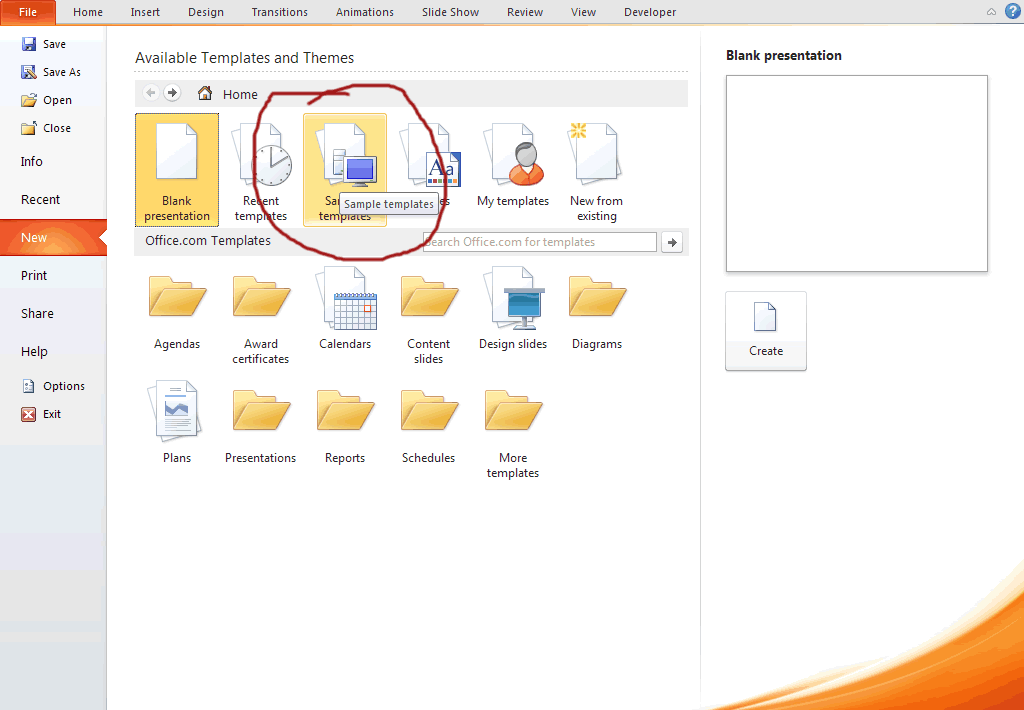
Clicking on a template category will display thumbnail images of all the templates within that category. When you find a template you like the look of, click on its thumbnail to select it and you will see a preview of it on the right of the panel. You can then click Create to create your PowerPoint presentation based on this template.

Sometimes you just can't find a template that precisely matches what you need, and in these circumstances, what many people do is use a template that is the closest fit and then modify it.
There are many free templates available from within PowerPoint, and also freely downloadable from other websites on the internet. In addition to using those that ship with PowerPoint, you can also purchase stylish and professionally designed templates for PowerPoint presentations from vendors like SmileTemplates.